
Download Siml ai – AI‑powered Simulation Platform for Engineers
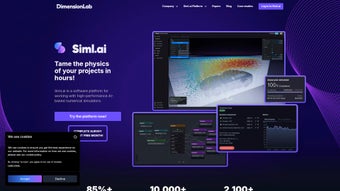
Siml.ai is a cloud‑native, AI‑driven simulation platform that lets engineers, researchers, and scientists accelerate numerical studies from days to mere hours. By combining high‑performance computing, parallel processing, and machine‑learning‑based recommendations, the service removes the traditional bottlenecks of mesh generation, solver configuration, and hardware provisioning. Whether you are solving fluid dynamics, structural mechanics, thermal transport, or multiphysics problems, Siml.ai delivers a secure, browser‑based workspace that works on Windows, macOS, Linux, Android, and iOS. The platform is built around two core modules: **Model Engineer**, an intelligent wizard that guides you through geometry import, material definition, and meshing, and **Simulation Studio**, a drag‑and‑drop environment where you launch, monitor, and analyse simulations in real time. With built‑in version control, role‑based access, and ISO‑27001‑compliant encryption, Siml.ai provides the speed, reliability, and data protection that modern engineering teams demand.
Overview – How Siml.ai Transforms Your Simulation Workflow
In a competitive engineering world, rapid iteration is the key to winning contracts and publishing research. Siml.ai tackles this challenge by abstracting the complexity of high‑performance simulation into an intuitive, web‑based interface. After you upload a CAD model, the AI engine analyses geometry, suggests the most appropriate meshing strategy, and recommends solver settings that have proven convergence on similar benchmark cases. This “learn‑as‑you‑go” approach reduces the trial‑and‑error phase that traditionally consumes weeks of analyst time.
Once the model is ready, Simulation Studio distributes the workload across a scalable fleet of CPU and GPU nodes in the cloud. The platform automatically selects the optimal compute type for each physics domain, meaning you pay only for the resources you truly need. Live dashboards display progress bars, log streams, and convergence diagnostics, so you never have to stare at a terminal window waiting for a job to finish. After completion, results are visualised directly in the browser with interactive 3D viewers, contour plots, and time‑history charts, and can be exported to formats such as VTK, CSV, or HDF5 for deeper analysis in tools like ParaView, MATLAB, or Python.
Security is baked into every layer of Siml.ai. All data transfers use TLS 1.3 encryption, while user files are stored in isolated Docker containers that meet ISO 27001 standards. Version control lets teams branch, merge, and rollback models, ensuring a full audit trail of design decisions. By merging AI assistance, cloud scalability, and enterprise‑grade security, Siml.ai positions itself as a central hub for next‑generation engineering simulation.
Key Features (itemprop="featureList")
- AI‑Assisted Model Building – Automatic meshing, material selection, and solver configuration based on learned best practices.
- Parallel Cloud Execution – Seamless distribution of simulations across CPU and GPU clusters for massive speed‑ups.
- Real‑Time Convergence Monitoring – Instant alerts for divergence, mesh quality issues, or ill‑conditioned matrices.
- Web‑Based Interactive Visualization – 3D viewers, contour maps, and plotters available directly in the browser.
- Secure Multi‑Tenant Architecture – TLS encryption, isolated containers, and role‑based access control.
- Version Control & Collaboration – Git‑style branching, merging, and rollback for team projects.
- Export & Integration Options – CSV, VTK, HDF5 outputs; direct links to MATLAB, Python, and commercial CAE tools.
- Automatic Resource Optimization – AI predicts optimal node type (CPU vs. GPU) to minimise cost.
- Custom Solver Plugins – Upload proprietary solvers or scripts to extend functionality.
- Continuous Updates & Dedicated Support – Monthly AI model improvements and a responsive help desk.
Pros and Cons
Pros
- Drastic reduction in setup and run time thanks to AI guidance and cloud parallelism.
- Zero‑install, browser‑only access works on any modern OS.
- Enterprise‑grade security protects intellectual property.
- Scalable pricing fits freelancers, academic labs, and large corporations.
- Integrated version control streamlines teamwork and auditability.
Cons
- Requires a reliable internet connection; offline use is limited to optional Docker containers.
- Learning curve for users accustomed to traditional desktop CAE packages.
- Advanced custom solver integration needs programming knowledge.
- Free tier imposes caps on compute hours and model size.
- Data residency currently limited to North America and Europe.
Installation, Usage & Compatibility (itemprop="operatingSystem")
Siml.ai is delivered as a Software‑as‑a‑Service (SaaS), so there is no heavy client installation. All you need is a modern web browser that supports WebGL and HTML5. The platform has been tested on Windows 10/11, macOS Monterey or newer, major Linux distributions, as well as mobile browsers on Android 8+ and iOS 13+. Because the heavy computation occurs in the cloud, your local device only requires a stable internet connection (minimum 5 Mbps recommended) and at least 8 GB of RAM for optimal visualization performance.
Step‑by‑step onboarding:
- Navigate to https://siml.ai and click “Sign Up”.
- Select a plan – Free, Professional, or Enterprise – and complete the payment if required.
- Confirm your email address and enable two‑factor authentication.
- Open the “Model Engineer” module and upload your CAD file (STEP, IGES, STL).
- Follow the AI‑driven wizard to assign materials, boundary conditions, and choose the physics domain.
- Save the model; then switch to “Simulation Studio” to set runtime options (cores, GPU usage, output frequency).
- Press “Run Simulation”. Siml.ai provisions the necessary cloud resources and streams live logs to your dashboard.
- When the job finishes, explore results in the built‑in 3D viewer or download data for external post‑processing.
For power users, Siml.ai offers a fully documented RESTful API that follows the OpenAPI specification. You can programmatically upload models, trigger simulations, and retrieve results using Python, JavaScript, or MATLAB, making it ideal for parametric studies or CI/CD integration. Additionally, an optional Docker image lets organizations run the entire stack on private on‑premise clusters while preserving the same UI and AI features.
Frequently Asked Questions (FAQ)
Can I run Siml.ai on a mobile device?
Yes. The responsive web interface works on Android and iOS browsers, allowing you to launch, monitor, and review simulations from any smartphone or tablet. Complex visualisations are best viewed on a larger screen, but basic monitoring is fully supported.
What happens to my data after a simulation finishes?
All input files, intermediate checkpoints, and results are stored in encrypted storage for the duration of your subscription. You can download any data at any time, and the platform automatically purges files after 90 days of inactivity unless you archive them manually.
Is there a free version of Siml.ai?
Siml.ai offers a free tier that provides up to 5 hours of compute per month, basic AI recommendations, and community‑only support. It is ideal for students, hobbyists, or anyone who wants to evaluate the platform before upgrading.
How does Siml.ai ensure simulation accuracy?
The AI engine is trained on thousands of validated benchmark cases across multiple physics domains. It suggests meshing and solver parameters that have demonstrated convergence, and real‑time diagnostics alert you to numerical issues, allowing corrective actions before the run completes.
Can I integrate Siml.ai with my existing CI/CD pipeline?
Absolutely. Siml.ai provides a fully documented REST API and Docker images that can be invoked from Jenkins, GitLab CI, Azure DevOps, or any other automation tool. This enables automated parametric sweeps and regression testing as part of your software development workflow.
Conclusion & Call to Action
Siml.ai represents a transformative step in engineering simulation, merging AI‑driven model creation with cloud‑scale parallel execution and a secure, browser‑only UI. The platform delivers the speed needed to keep pace with rapid product development cycles while maintaining the rigor required for high‑stakes analysis. Whether you are a solo consultant looking to win more bids, an academic lab seeking affordable HPC resources, or an enterprise engineering team needing collaborative simulation management, Siml.ai scales to meet your demands.
Ready to accelerate your simulations? Create a free account today and experience AI‑guided modelling that cuts weeks of work down to hours. For organizations that require dedicated compute clusters, on‑premise Docker deployments, or custom SLA terms, contact the Siml.ai sales team for a tailored enterprise package.
Rating: 4.7/5
Pros
- Fast AI‑guided setup slashes pre‑processing time.
- Scalable cloud resources handle large parametric studies.
- Secure, web‑based access works on any OS.
Cons
- Limited offline capability; requires internet.
- Advanced custom solver integration needs programming skill.



.png)



